If your WhatsApp bot is sending the same generic replies to every customer, you’re missing a huge opportunity.
Today’s customers expect conversations that feel personal, helpful, and fast. They want order updates in real time. They want product recommendations that match their interests. They want an experience that feels human, even when it’s automated.
Dynamic responses are how you deliver that experience.
At Bowaba, we help businesses across the GCC leverage Wati’s WhatsApp API and chatbot platform, and we handle the full setup for you. In this post, we’ll explain exactly what dynamic responses are, why they matter, and how we help you build them.
Why Dynamic Responses Matter
Think about the last time you chatted with a brand.
If every message was a canned, robotic reply, it probably wasn’t a great experience.
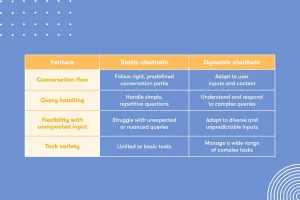
Static bots frustrate customers because they:
- Feel impersonal
- Don’t answer real questions
- Force users into rigid flows
- Can’t adapt to different user needs
Dynamic bots, on the other hand:
- Personalize responses with names, order info, product details
- Adapt the conversation based on what the user says
- Provide helpful answers in real time
- Create a two-way experience, not just one-way automation
In short: dynamic responses make your bot smarter, and help you build trust, loyalty, and conversions.
What Is a Dynamic Response?
A dynamic response is any message that changes based on customer data, user input, or system variables.
Example:
Instead of sending this:
“Hello. Your order is being processed.”
You can send this:
“Hi Omar, your order #A8932 is being packed and will ship tomorrow. You’ll receive tracking details soon.”
It’s a small difference,but it makes the conversation feel alive, personalized, and human.
That’s exactly what we help you build with Wati, using its API, automation flows, and variable-driven messages, fully set up and managed by Bowaba.
Step 1: Map Out Key Conversation Flows
Before you can create dynamic responses, you need to know what your customers expect.
At Bowaba, our team starts by working with you to map:
- The most common customer questions
- The typical purchase journey
- Where users drop off in the process
- Post-purchase needs (order tracking, returns, loyalty programs)
- Support scenarios
This helps us identify:
- Which parts of the conversation should be automated
- Where dynamic responses will add value
- How to personalize messaging in ways that feel natural
Many businesses skip this step, but it’s critical for building a bot that actually delivers a great experience.
Step 2: Define the Variables You Need
Dynamic responses rely on variables, placeholders that get filled with real-time data.
Some common variables we set up for clients include:
- Customer name
- Last order ID
- Product details (name, size, color)
- Delivery date
- Loyalty tier or membership level
- Account balance or points
This allows the bot to send highly personalized replies, automatically.
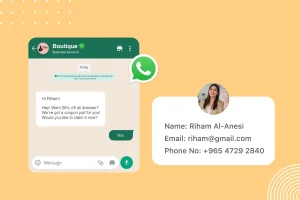
For example:
“Hi Fatima, your loyalty status is now Platinum. You’ve unlocked 20% off your next purchase.”
Step 3: Integrate With Your Business Systems
Here’s where a lot of bots fail, they aren’t connected to live business data.
At Bowaba, we handle all the integrations needed to make your dynamic responses possible:
- CRM platforms
- E-commerce sites (like Shopify, Magento, WooCommerce)
- Payment gateways
- Loyalty systems
- Shipping and fulfillment systems
When a customer asks: “Where is my order?”, your bot can pull live tracking info and respond instantly.
When a customer types: “What’s my loyalty balance?”, the bot gives them an up-to-date answer.
This is what turns your bot into a true self-service tool, reducing your team’s workload while improving customer satisfaction.
Step 4: Build and Test Dynamic Message Templates
Once variables and integrations are ready, we build dynamic message templates inside Wati.
Common examples include:
- Order confirmations
- Shipping updates
- Abandoned cart reminders
- Back-in-stock alerts
- Loyalty level updates
- Personalized product recommendations
- Re-engagement messages for inactive customers
We also test each message to ensure:
- Variables populate correctly
- The tone and style match your brand voice
- The message flow feels natural and intuitive
Testing matters, because no one wants a bot that says: “Hi , your order is on the way.”
Step 5: Launch and Continuously Improve
A bot is never finished. Customers need change. Business priorities shift.
That’s why Bowaba continues to monitor performance after launch:
- Which dynamic responses are driving the most engagement?
- Where are customers getting stuck?
- How can we make the flow smoother or more helpful?
We provide regular reports and recommendations, helping you refine your conversational strategy over time.
How Bowaba Helps You Succeed With Wati Bots
Yes, Wati provides one of the best WhatsApp API and bot platforms in the market.
But to build a truly dynamic, personalized, high-converting bot, you need expert setup, integration, and optimization.
That’s where Bowaba comes in. We provide:
- Full Wati API setup and management
- Conversation flow design
- Integration with your business systems
- Dynamic message building and testing
- Ongoing optimization and support
You don’t just get a bot. You get a fully managed conversational commerce solution, ready to drive measurable results.
Ready to create a smarter, more dynamic WhatsApp bot?
Book a free demo today or contact us on WhatsApp to get started today.