

What if you could deliver order updates faster than you can hit “send”? Imagine your customers receiving real-time updates about their orders, directly on the app they already use daily—no waiting, no frustration.
With WhatsApp, this is exactly the kind of seamless, instant communication your business can offer. In a world where convenience is king, using WhatsApp for order tracking isn’t just a nice-to-have—it’s a game-changer. Whether it’s a small business or a global brand, leveraging WhatsApp to keep customers updated can boost satisfaction, reduce inquiries, and even increase loyalty.
In this post, we’ll show you how easy it is to integrate WhatsApp into your order-tracking process and why it’s one of the best tools for building trust and engaging your customers.
Why WhatsApp?
Before we dive into the specifics, let’s quickly talk about why WhatsApp is the platform you want to use for order tracking. With over 1.6 billion daily active users, WhatsApp is more than just a messaging app—it’s a massive communication tool that businesses around the world are using to engage with customers.
1. Real-Time, Personal Updates
Customers want to know where their orders are in real-time. If they don’t get an update, they’ll likely start to worry. According to a HubSpot survey, 90% of consumers expect a reply from businesses within 10 minutes. WhatsApp’s instant messaging is perfect for fast, real-time order updates—whether it’s confirming an order, notifying them when it’s shipped, or letting them know it’s on its way.
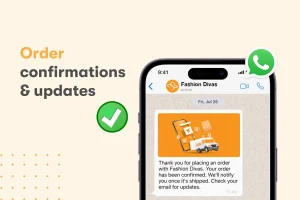
For example, let’s say you run an online store. As soon as an order is placed, send a confirmation message right away. When it ships, update them with tracking information. When it’s delivered, send a “thanks for shopping” message. Simple, but effective.
2. Building Trust and Transparency
WhatsApp helps you create transparency. When customers are updated throughout the journey of their order, they feel more confident. A study from Shopify shows that 63% of customers say tracking deliveries in real-time makes them more likely to return to a store. With WhatsApp, you can send automatic updates like “Your order has been dispatched” or “Your order is out for delivery,” which reassures your customers that everything’s going smoothly.
Take a cue from Domino’s Pizza, which uses WhatsApp to send live delivery updates to customers. Messages like “Your pizza is in the oven” or “Your pizza is 10 minutes away” help customers feel involved in the process.
3. 24/7 Customer Service with WhatsApp Bots
What if you could automate updates and customer service? With WhatsApp bots, you can! Automated bots can send order tracking information 24/7, answering common questions like, “Where’s my order?” or “When will my delivery arrive?”
Take Nike, for instance. Nike uses automated WhatsApp bots to provide order updates, handle exchanges, and assist with tracking—all without human intervention. It’s a win-win: customers get instant answers, and you reduce your customer service workload.
CHECK OUT: How to Use WhatsApp for B2B Customer Support

4. Why WhatsApp Beats Email for Order Updates
Email may still be an important communication tool, but it’s easy for order updates to get lost in crowded inboxes. WhatsApp, on the other hand, delivers your messages directly to the customer’s phone—meaning they’re much more likely to see and act on your updates.
Plus, WhatsApp lets you send rich media: clickable links, images, and even videos. For example, if there’s a slight delay in shipping, you could send a quick video message or an image showing the current status of the delivery. It’s personal, engaging, and much more effective than a plain text email.
5. A Cost-Effective Solution
While SMS updates can rack up costs, WhatsApp is free for customers and low-cost for businesses. WhatsApp Business API allows you to send updates in bulk, making it a cost-effective choice for scaling customer communication. You can send thousands of updates without breaking the bank.
How to Set Up WhatsApp for Order Tracking
Now that you understand why WhatsApp is so powerful, let’s walk through the steps to get it set up for your business.
1. Set Up WhatsApp Business Account
Start by creating a WhatsApp Business account. It’s free and comes with useful features like automated greeting messages, quick replies, and chat labels to help you organize conversations.
If you want to scale up with bulk messaging and integrate it into your order management system, you’ll need WhatsApp Business API. This option is perfect for larger businesses.
2. Create Order Update Templates
Next, create templates for different stages of the order process. These might include:
- Order Confirmation: “Your order has been confirmed! We’ll send an update when it’s shipped.”
- Shipped Notification: “Your order is on its way! Track your package here: [Tracking Link].”
- Delivery Confirmation: “Your order has been delivered. We hope you enjoy your purchase!”
These templates can be personalized with the customer’s name and order details to make the communication feel more personal.
3. Automate Updates with Bots
To make your life easier, set up a WhatsApp bot that sends automated order updates based on your business’s order management system. This way, when an order status changes, your bot will automatically send out updates to the customer, no human needed!
4. Offer Customer Support Through WhatsApp
In addition to updates, give your customers the option to contact you directly via WhatsApp for any questions or issues. For example, if there’s a delay or a problem with their order, they can quickly reach out and get help. Make sure to provide a “Contact Us” button in every update.
Best Practices for WhatsApp Order Tracking
To make sure your WhatsApp order updates are as effective as possible, keep these best practices in mind:
- Be Personal: Use the customer’s name and specific order details to make the communication feel personal.
- Keep It Simple: Don’t overwhelm customers with too much info. Stick to the key updates: “Order Confirmed,” “Shipped,” and “Delivered.”
- Use Rich Media: Include images, clickable links, and videos to keep things engaging.
- Make Opting Out Easy: Always give customers a simple way to unsubscribe from order updates if they no longer want them.
Real-World Examples: WhatsApp in Action
Here’s how some big-name companies are already making the most of WhatsApp for order tracking:
- KLM Airlines: KLM is a leader in customer service, using WhatsApp to send flight updates, booking confirmations, and boarding passes directly to passengers. It’s fast, easy, and convenient.
- H&M: H&M uses WhatsApp to send shipping updates and delivery notifications to customers. Personalized, timely updates help customers feel informed and valued.
Ready to Upgrade Your Customer Experience?
Using WhatsApp for order tracking and updates isn’t just about sending notifications—it’s about improving the customer experience, building trust, and keeping your customers happy. With real-time updates, cost-effective communication, and the ability to integrate automation, WhatsApp is the perfect tool for businesses of all sizes.
Whether you’re a small business just starting out or a large enterprise, using WhatsApp for order tracking can help you stand out in a crowded market and deliver a customer experience that keeps people coming back for more. So, why not start today?